ArchParser: Architectural Drawing Analysis Platform
Full-stack TypeScript application for OCR-based architectural drawing analysis and management.
Project Overview
Project Type:Personal/Open Source
Role:Product Designer & Full-Stack Developer
Timeline:2025 (Ongoing)
Development Partner: Built with Claude Code (Anthropic's AI development assistant)
THE CHALLENGE: Construction project managers at Component Assembly Systems needed a way to efficiently extract metadata from hundreds of architectural drawing PDFs. Manual data entry from title blocks (drawing numbers, revision dates, project names) was time-consuming, error-prone, and didn't scale for projects with 500+ page drawing sets. No existing tools could handle the specialized OCR requirements or support custom title block layouts across different architectural firms.
MY ROLE: I designed and developed ArchParser, a full-stack TypeScript application that automates the extraction of drawing metadata using OCR technology. I created both the technical architecture and user experience, focusing on reliability, performance, and flexibility to handle diverse document formats.
THE SOLUTION: ArchParser is a monorepo application with a NestJS backend for OCR processing and a React/PatternFly frontend for drawing management. The system features customizable OCR templates with a visual template creator, memory-optimized processing for large PDFs, and an optional AI chatbot for semantic search. The platform successfully processes drawing sets of 500+ pages while maintaining accurate metadata extraction.
THE IMPACT:
- Automated metadata extraction from architectural drawings, eliminating manual data entry
- Successfully processes 500+ page PDF drawing sets with memory optimization
- Visual template creator allows non-technical users to configure OCR extraction regions
- Revision tracking system maintains drawing set history and version comparisons
- Real-time WebSocket progress updates keep users informed during long-running OCR jobs
- Centralized path management system ensures reliability across deployment environments
- Open-source project serving as portfolio demonstration of full-stack capabilities
The Development Process
Unlike traditional design-first projects, ArchParser required simultaneous development of both technical architecture and user experience. The process was highly iterative, driven by real-world testing with large PDF sets and continuous feedback from construction project managers.
Development approach:
- Problem validation & requirements gathering
- Interviewed construction project managers about their drawing management workflows
- Identified pain points: manual data entry, inconsistent title block formats, large file sizes
- Determined core requirements: OCR accuracy, template flexibility, performance at scale
- Technology stack selection
- Chose TypeScript monorepo for type safety across frontend and backend
- Selected NestJS for backend (familiar enterprise patterns from AWS experience)
- Used React with PatternFly UI (leveraging my Red Hat design system expertise) - later changed to RadixUI
- Implemented Tesseract.js for client-side OCR processing
- Iterative development with Claude Code
- Used Claude Code as a development partner for architecture decisions and implementation
- Leveraged AI assistance for complex TypeORM migrations and NestJS module structure
- Rapid prototyping of OCR extraction algorithms with Claude's code generation
- Collaborative debugging of memory optimization and path management issues
- Real-world testing & optimization
- Tested with actual 500+ page architectural drawing sets from construction projects
- Identified and resolved critical memory constraints through optimization iterations
- Refined OCR accuracy through template system improvements
Working with Claude Code as a development partner:
- Architecture & Planning: Claude helped design the monorepo structure, database schema, and path management system. We discussed trade-offs between different approaches (absolute vs. relative paths, synchronous vs. batch processing) before implementation.
- Code Generation & Implementation: Claude generated boilerplate code for NestJS modules, TypeORM entities, and React components following established patterns. This accelerated development while maintaining consistency.
- Problem Solving: When facing complex issues (memory leaks in OCR processing, path resolution bugs), Claude helped analyze logs, identify root causes, and propose solutions. The collaborative debugging process was particularly valuable for tricky issues like the path management overhaul.
- Documentation: Claude assisted in writing comprehensive documentation (CLAUDE.md, README files, inline comments) that explains not just what the code does, but why architectural decisions were made.
- Testing & Quality: Claude helped write test utilities, fixtures, and unit tests for both frontend and backend. The AI's ability to generate edge cases I hadn't considered improved test coverage.
Technical Architecture
ArchParser is built as a TypeScript monorepo with three primary workspaces: backend (NestJS), frontend (React/Vite), and shared type definitions. The architecture emphasizes type safety, memory efficiency, and extensibility.
Backend
NestJS
Core Modules:
- Drawing Processing Service: Handles PDF-to-PNG conversion and Tesseract.js OCR extraction
- OCR Template System: Configurable extraction regions for different title block formats
- Path Management: Centralized path resolution with environment variable support for deployment portability
- WebSocket Gateway: Real-time progress updates during OCR processing
- Optional LLM Service: AI-powered semantic search (Claude, OpenAI, or local Ollama)
Database (TypeORM + MySQL):
- Entities: Job, DrawingSet, Drawing, OcrTemplate, KnowledgeChunk
- Supports revision tracking through self-referencing DrawingSet relationships
- Stores relative paths in database for deployment portability
Frontend
React + RadixUI
Key Features:
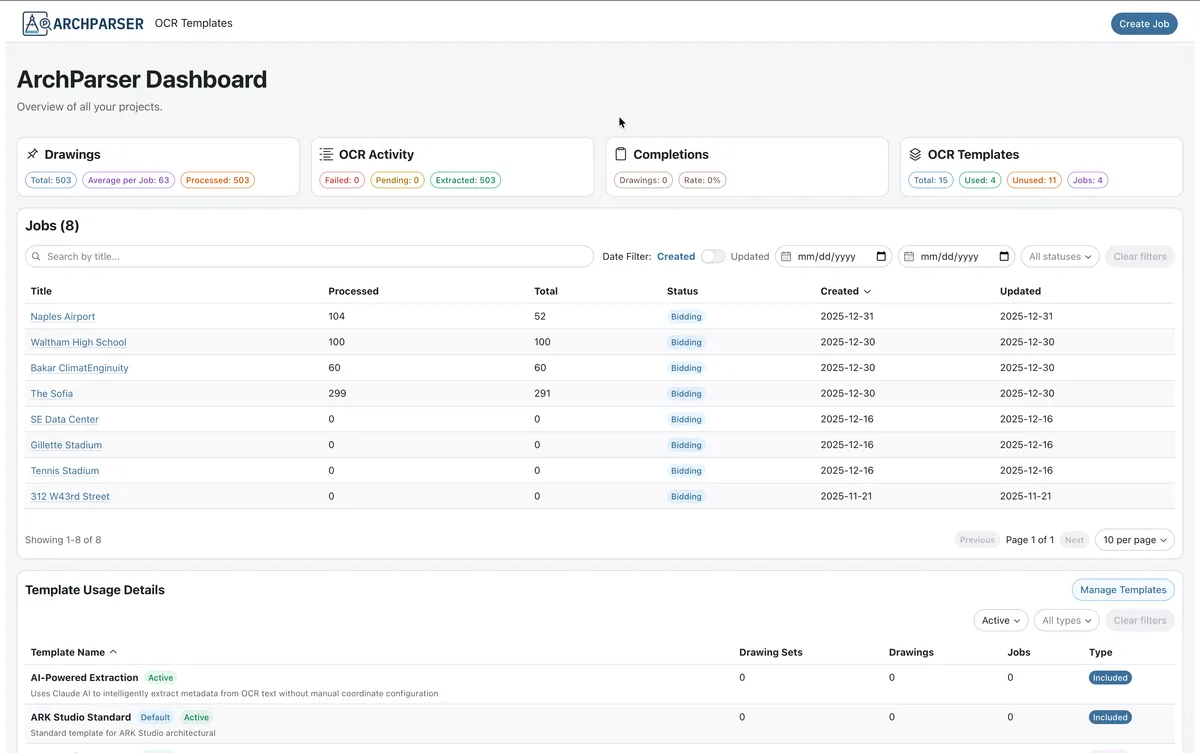
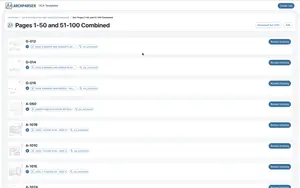
- Dashboard: Job listing with pagination, sorting, and filtering
- Upload Workflow: PDF upload with OCR template selection and classification
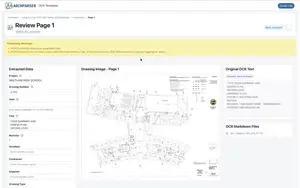
- Drawing Review: Individual drawing detail pages with metadata editing
- Real-time Progress: WebSocket-powered progress indicator for OCR jobs
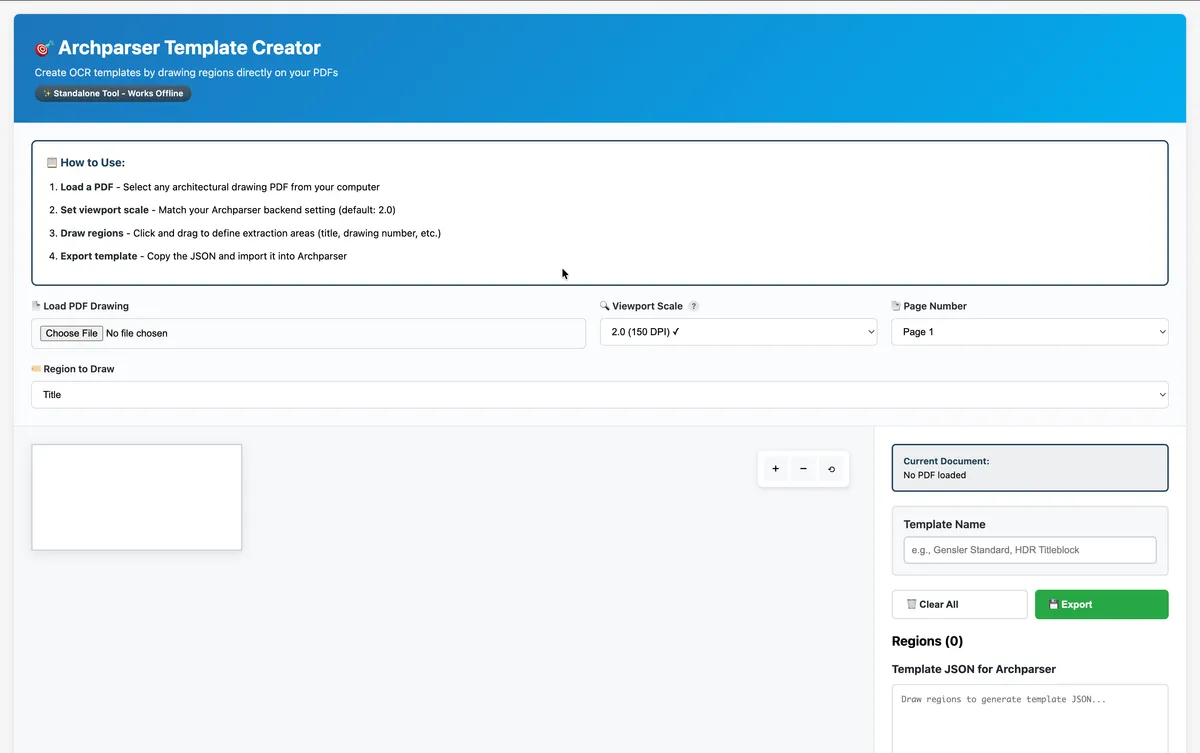
- Template Creator: Visual interface for creating OCR extraction templates
UI/UX Decisions:
- RadixUI components for accessibility and consistency
- Responsive grid layouts for data-dense tables
- Inline editing for quick metadata corrections
- Mock server support for frontend-only development
Template Creator
Standalone Tool
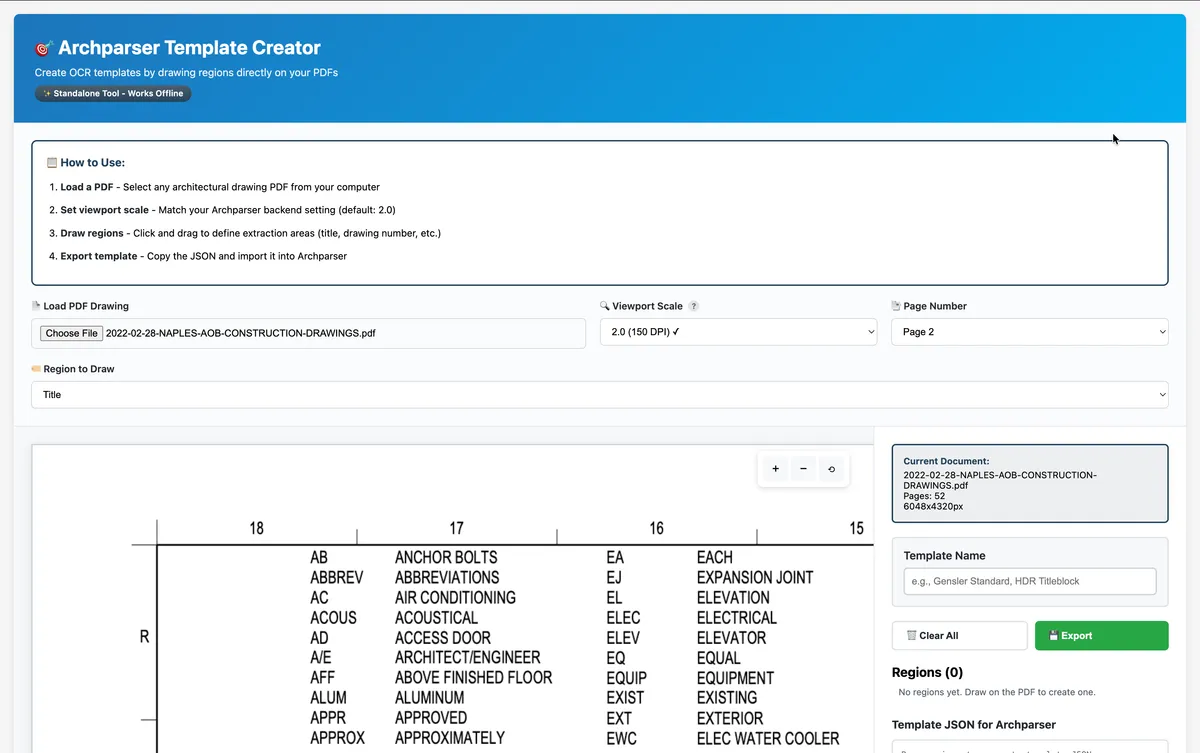
Built as a standalone HTML/JavaScript tool using PDF.js, the template creator allows users to:
- Upload a sample PDF and render it in the browser
- Draw rectangular regions on the PDF to define extraction areas
- Label regions (drawing number, title, date, revision, etc.)
- Export template JSON for import into ArchParser
- Works offline with no backend dependency
This tool democratizes OCR template creation—construction managers can create templates without developer assistance.
Key Iterations & Problem Solving
Throughout development, several critical issues emerged that required significant architectural changes. Each iteration improved reliability, performance, or usability based on real-world testing.
Iteration 1: Memory Optimization for Large PDFs
Problem: Processing 500+ page PDFs caused memory exhaustion and server crashes. The initial implementation converted entire PDFs to PNG images in memory before processing.
Solution: Implemented single-page PDF conversion and dynamic batch processing:
- Convert one PDF page at a time instead of the entire document
- Adjust batch sizes based on document size (smaller batches for larger PDFs)
- Add memory monitoring and garbage collection tuning
- Process OCR regions sequentially to prevent memory spikes
Result: Successfully processes 500+ page documents without crashes. Memory-optimized startup script (start-optimized.sh) provides production-ready performance.
Iteration 2: Path Management System Overhaul
Problem: Processed drawings became disassociated from database records after server restarts. Three root causes identified:
- Inconsistent path resolution between
process.cwd()and__dirname - Directory naming mismatch during deletion operations
- Absolute paths in database made system non-portable across environments
Solution: Complete path management overhaul with centralized configuration:
- Created
storage.config.tswith centralized path constants - Implemented
toRelativePath()andtoAbsolutePath()utilities - Standardized folder naming:
{sanitizedName}_{jobId}format - Updated all services to use centralized path resolution
- Wrote migration script to convert 373 existing records from absolute to relative paths
Result: System is now portable across deployment environments. Paths resolve correctly regardless of server startup directory. Database can be migrated to new servers without breaking file associations.
Iteration 3: Dashboard UI Enhancement
Problem: Initial dashboard struggled with high-volume data tables. Users needed better filtering, sorting, and status visualization.
Solution: Comprehensive dashboard refactoring:
- Added independent pagination and sorting for Job and Template tables
- Implemented date range filtering with "Created" and "Updated" pivots
- Added status (Active/Archived) and type (Included/Custom) filters
- Created Kanban-style Monitor Dashboard for job status visualization
- Added Floating Action Button (FAB) for streamlined task creation
- Persisted filter selections in local storage for session continuity
Result: Users can efficiently navigate large datasets. The Kanban view provides at-a-glance status monitoring, while table filters enable rapid data discovery.
Results & Impact
Technical Achievements
- Performance: Successfully processes 500+ page PDF drawing sets with memory-optimized batch processing
- Accuracy: OCR template system with configurable regions achieves reliable metadata extraction across diverse title block formats
- Type Safety: Shared TypeScript interfaces across monorepo prevent runtime errors and improve developer experience
- Real-time Updates: WebSocket integration provides live progress feedback during long-running OCR jobs
- Portability: Centralized path management enables deployment across different server environments without configuration changes
- Test Coverage: 14 backend test suites with 53 tests, plus comprehensive frontend component testing
User Experience Wins
- Visual Template Creator: Non-technical users can create OCR templates by drawing regions on PDFs—no code required
- Revision Tracking: Drawing set relationships enable version comparison and change tracking
- Enterprise UI: PatternFly components provide accessible, professional interface familiar to enterprise users
- Mock Server: Frontend developers can work independently without backend/database dependency
- Flexible AI Integration: Optional LLM features support Claude, OpenAI, or free local Ollama—users choose based on budget and privacy needs
Development Process Insights
- AI-Assisted Development: Claude Code accelerated development by 2-3x through intelligent code generation, debugging assistance, and architectural guidance
- Monorepo Benefits: Shared types across workspaces caught integration bugs at compile time rather than runtime
- Iterative Optimization: Real-world testing with large PDFs revealed performance bottlenecks that wouldn't have been found in small-scale testing
- Documentation-Driven: Comprehensive CLAUDE.md file serves as both AI context and developer onboarding guide
- Open Source: Public GitHub repository demonstrates full-stack capabilities and serves as portfolio piece
What I Learned
This project provided valuable insights about full-stack development, AI-assisted coding, and building for real-world constraints:
- Memory constraints require proactive optimization. The initial implementation worked fine for small PDFs but crashed on real-world 500+ page documents. Building with realistic test data from the start would have caught this earlier. Memory profiling and optimization became critical skills.
- AI development assistance is transformative when used strategically. Claude Code was most valuable for architectural planning, debugging complex issues, and generating boilerplate. I learned to use AI as a collaborative partner—explaining problems thoroughly, reviewing generated code critically, and iterating on solutions together. The key is maintaining ownership of architectural decisions while leveraging AI for implementation acceleration.
- Path management is harder than it looks. The path resolution issues taught me that assumptions about working directories break in production. Centralizing path logic and storing relative paths in the database made the system portable and maintainable. This lesson applies broadly: centralize cross-cutting concerns early.
- User empowerment beats technical complexity. The visual template creator was more impactful than any backend optimization. Enabling non-technical users to configure OCR templates themselves removed a bottleneck and increased adoption. Simple, visual tools often provide more value than sophisticated algorithms.
- Design system expertise translates across contexts. My experience with PatternFly at Red Hat paid dividends—I could build an enterprise-grade UI quickly while ensuring accessibility and consistency. Design systems aren't just for design teams; they accelerate solo development too.
- Monorepo structure enforces discipline. Shared TypeScript interfaces between frontend and backend prevented the API contract drift that plagues many full-stack projects. The initial setup overhead was worth it for the compile-time safety and refactoring confidence.
ArchParser demonstrated that full-stack development—especially with AI assistance—enables rapid prototyping and iteration. By combining my design background with technical implementation, I could build and refine features based on direct user feedback without handoff delays. The project serves as both a practical tool for construction project management and a portfolio demonstration of end-to-end product development capabilities.